

Choosing the right Android app development company is one of the most important decisions for your business. A skilled development partner can help you build a fast, user-friendly, and scalable Android app that supports your long-term business goals. The wrong company can lead to delays, budget problems, poor app performance, and negative user reviews on the Google Play Store.
Many businesses struggle because they hire developers based only on low pricing or attractive sales promises. I have seen companies spend months fixing poor code, redesigning bad user experiences, and rebuilding unstable apps after launch. A weak development process often creates hidden costs that become much larger later.
This guide explains how to choose the right Android app development company step by step. You will learn what Android development companies actually do, how to evaluate their technical skills, what questions to ask before signing a contract, which red flags to avoid, and how to find a team that can build a reliable Android app for your business.
What Does an Android App Development Company Do?
An Android app development company plans, designs, develops, tests, launches, and maintains mobile applications for Android devices. These companies help businesses turn app ideas into functional products that work smoothly across smartphones, tablets, and different Android versions.
1. Android App Strategy and Planning
Android app strategy and planning define the app’s goals, features, target audience, and technical requirements before development starts. A professional company studies your business model, competitors, and user needs to create a clear roadmap for the project.
This stage helps prevent budget overruns and unnecessary feature changes later. I have seen projects fail because businesses skipped proper planning and started coding too early. A structured strategy keeps the app focused on solving real user problems while supporting business growth.
2. UI/UX Design for Android Devices
UI/UX design for Android devices creates the visual layout and user experience of the app. Android designers follow Google’s Material Design principles to make apps simple, responsive, and easy to navigate.
A strong design improves user retention and reduces frustration. Good Android UX also considers different screen sizes, device resolutions, and touch interactions. The goal is to make every feature feel natural for Android users from the first tap.
3. Android App Development and Coding
Android app development and coding turn the app design into a working application using technologies like Kotlin, Java, Flutter, or React Native. Developers build the frontend interface, backend systems, APIs, and app functionality during this phase.
Professional developers focus on performance, security, scalability, and clean code structure. I recently reviewed an Android app that crashed on older devices because the original developers ignored memory optimization. Strong coding practices reduce these technical issues and improve long-term app stability.
4. Testing Across Multiple Android Devices
Testing across multiple Android devices checks whether the app works properly on different phones, tablets, screen sizes, and Android operating systems. Android has thousands of device combinations, which makes testing more complex than many other platforms.
A reliable development company performs manual testing, automated testing, performance testing, and bug fixing before launch. This process helps identify crashes, slow loading times, broken layouts, and compatibility problems early.
5. Google Play Store Submission
Google Play Store submission prepares and publishes the app on the official Android marketplace. The development company handles app packaging, store listing creation, screenshots, descriptions, privacy policies, and compliance requirements.
An experienced team understands Google Play policies and helps avoid app rejection issues. They also optimize the listing for visibility using proper keywords, categories, and app metadata.
6. App Maintenance and Updates
App maintenance and updates keep the Android app secure, compatible, and functional after launch. Android operating systems change regularly, and apps need updates to maintain performance and security.
Maintenance services usually include bug fixes, feature updates, server monitoring, and compatibility testing. I have worked with businesses that lost users because their apps stopped working after a major Android update. Regular maintenance prevents these problems and protects the user experience over time.
Why Choosing the Right Android App Development Company Matters
Choosing the right Android app development company matters because it directly affects your app’s quality, performance, security, user experience, and long-term business success. A skilled development partner helps you launch a stable app that works across different Android devices while protecting your budget and timeline.
1. Android Has a Large and Diverse User Base
Android has the largest mobile operating system user base in the world, which gives businesses access to millions of potential customers. Android users come from different regions, devices, screen sizes, and performance levels.
A professional Android development company understands how to build apps that perform well for this diverse audience. They optimize the app for both high-end and budget Android devices to improve reach and user satisfaction.
2. Device Compatibility Is More Complex Than iOS
Android device compatibility is more complex than iOS because Android runs on thousands of smartphones and tablets from different manufacturers. Each device may use different screen sizes, hardware configurations, and Android versions.
An experienced Android development company tests the app across multiple devices to reduce crashes and layout issues. I once audited an Android app that worked perfectly on one Samsung device but failed completely on several Xiaomi phones because the developers skipped compatibility testing.
3. Poor App Quality Leads to Negative Reviews
Poor app quality leads to negative reviews, low ratings, and reduced downloads on the Google Play Store. Users quickly uninstall apps that crash, load slowly, or provide a confusing experience.
Negative reviews damage brand trust and make it harder to attract new users. A reliable Android development company uses structured testing and quality assurance processes to deliver a stable and user-friendly app before launch.
4. A Well-Built Android App Increases ROI
A well-built Android app increases return on investment by improving customer engagement, retention, and business efficiency. High-quality apps help businesses generate more sales, strengthen customer loyalty, and reduce support costs.
I worked with a client whose upgraded Android app improved user retention after optimizing app speed and simplifying navigation. Better performance and usability often lead directly to higher revenue and long-term business growth.
5. Security and Performance Require Expertise
Android app security and performance require specialized technical expertise because mobile apps handle sensitive user data, payments, and real-time interactions. Weak security or poor optimization can expose users to risks and damage your reputation.
A professional Android development company follows secure coding standards, encrypts user data, and optimizes app performance for different devices. This approach helps protect your business while delivering a faster and safer experience for users.
Signs Your Business Needs an Android App Development Company
Your business needs an Android app development company when you lack technical expertise, your current app underperforms, or your business requires advanced mobile features that your internal team cannot build efficiently. A professional Android development partner helps you create scalable, high-performing apps that support long-term business growth.
1. You Have an App Idea but No Android Developers
If you have a strong app idea but no Android developers on your team, hiring an Android app development company becomes the fastest and safest solution. Professional developers can turn your concept into a working application while guiding you through design, development, testing, and launch.
Many businesses delay app projects because they do not have in-house mobile expertise. I have worked with startups that wasted months trying to build Android apps internally before hiring experienced developers to stabilize the project. A skilled agency helps you avoid technical mistakes early.
2. Your Existing Android App Performs Poorly
Your business needs professional Android development support if your current app crashes frequently, loads slowly, or receives negative user feedback. Poor app performance reduces customer trust and lowers retention rates.
Users expect Android apps to work smoothly across different devices and operating systems. A professional development company can audit your app, identify performance issues, improve the codebase, and redesign weak user experiences to improve overall app quality.
3. Your Competitors Have Better Mobile Apps
If your competitors offer faster, more modern, and feature-rich mobile apps, your business may struggle to keep users engaged. Customers often compare app experiences before deciding which brand to trust.
A professional Android app development company helps you close that gap with better functionality, cleaner design, and stronger performance. I recently reviewed two competing e-commerce apps where the faster app with simpler navigation consistently kept users active longer.
4. Your Business Needs Custom Android Features
Your business may require custom Android features such as payment systems, GPS tracking, push notifications, chat systems, or third-party API integrations. Basic app builders and template solutions usually cannot support complex business requirements.
An experienced Android development company creates custom solutions tailored to your operations and customer needs. This flexibility becomes important as your business scales and your technology requirements grow.
5. Your Internal Team Lacks Android Expertise
General software developers may not fully understand Android-specific technologies, device compatibility challenges, or Google Play Store requirements. Android development requires experience with tools like Kotlin, Java, Android Studio, and Firebase.
A dedicated Android development company brings specialized expertise that helps reduce technical risks and development delays. Businesses often save time and money by working with experienced Android professionals instead of training an internal team from scratch.
How to Choose an Android App Development Company
Choosing the right Android app development company requires evaluating the company’s technical skills, portfolio, communication process, pricing structure, and long-term support services. A reliable Android development partner should understand your business goals, build scalable apps, and provide transparent project management from planning to launch.
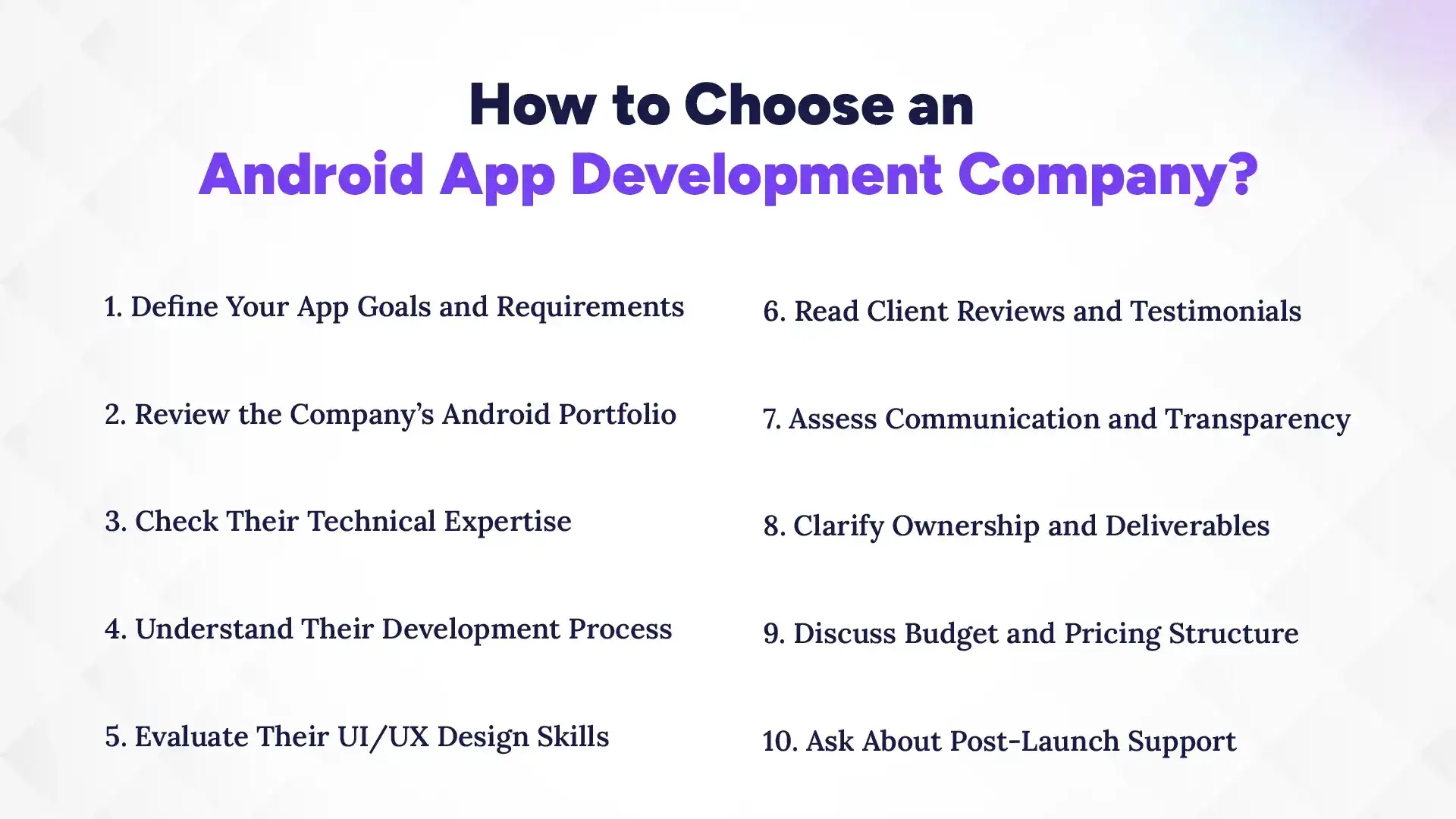
1. Define Your App Goals and Requirements
Defining your app goals and requirements helps you find a company that can build the right solution for your business. Clear planning also reduces project delays, budget issues, and feature confusion during development.
Identify Your Target Audience
Your target audience determines how the app should function, look, and perform. Different user groups expect different experiences based on their devices, behavior, and needs.
List Must-Have Features
Must-have features define the core functionality your app needs at launch. This may include login systems, payment gateways, push notifications, GPS tracking, or chat features.
Set Your Project Budget and Timeline
A clear budget and timeline help agencies estimate project scope accurately. Businesses that define realistic expectations early usually experience smoother development processes.
2. Review the Company’s Android Portfolio
Reviewing an Android portfolio helps you understand the company’s experience, app quality, and design standards. A strong portfolio shows real Android apps published on the Google Play Store.
Check Published Google Play Apps
Download and test the apps the company has already built. Live applications provide better proof of experience than screenshots alone.
Test App Performance and Design
Check app speed, navigation, responsiveness, and overall usability. A high-quality Android app should feel smooth and stable across devices.
Look at Ratings and User Reviews
User reviews often reveal real performance issues, bugs, or strengths. Positive ratings usually indicate better development quality and customer satisfaction.
3. Check Their Technical Expertise
Technical expertise determines whether the company can build secure, scalable, and high-performing Android applications. Experienced developers should understand modern Android technologies and frameworks.
Experience With Kotlin and Java
Kotlin and Java are the main programming languages for Android development. A strong Android company should have experience using both technologies.
Knowledge of Android Studio
Android Studio is the official Android development environment used for coding, testing, and debugging apps. Skilled developers use it to improve app performance and stability.
API Integration Capabilities
Modern Android apps often connect with payment systems, social platforms, maps, and external services through APIs. Proper API integration improves app functionality and automation.
Firebase and Backend Expertise
Firebase and backend systems manage user authentication, notifications, databases, and app storage. Backend expertise becomes important for scalable Android applications.
4. Understand Their Development Process
Understanding the company’s development process helps you evaluate how they manage projects, communication, and quality control. Structured workflows usually lead to better project outcomes.
Agile or Sprint-Based Workflow
Agile development divides projects into smaller phases called sprints. This method allows faster updates, continuous feedback, and flexible improvements.
Communication Process
Good communication prevents misunderstandings and delays. Professional companies provide regular updates and maintain clear reporting systems.
QA and Testing Methods
Quality assurance testing helps identify bugs, crashes, and compatibility issues before launch. Reliable agencies test apps across multiple Android devices and versions.
Deployment Strategy
Deployment includes preparing and publishing the app on the Google Play Store. An experienced team manages app submission, compliance, and release management.
5. Evaluate Their UI/UX Design Skills
UI/UX design directly affects user satisfaction and retention. Android apps should feel simple, responsive, and easy to navigate.
Android Material Design Knowledge
Material Design is Google’s official design system for Android apps. Skilled designers follow these guidelines to create consistent user experiences.
User-Friendly Navigation
Clear navigation helps users complete tasks quickly without confusion. A good app structure improves engagement and reduces app abandonment.
Responsive Design for Multiple Screen Sizes
Android devices use many different screen sizes and resolutions. Responsive design ensures the app works properly across phones and tablets.
6. Read Client Reviews and Testimonials
Client reviews help you understand the company’s reliability, communication quality, and project management style. Independent feedback often reveals real customer experiences.
Google Reviews
Google reviews provide public feedback from past clients. Consistent positive reviews usually indicate trustworthy service.
Clutch and G2 Ratings
Platforms like Clutch and G2 publish verified client ratings and project reviews. These sites help compare agencies based on performance and reputation.
Case Studies and Client Success Stories
Case studies show how the company solved real business problems. Strong case studies explain project goals, development challenges, and measurable results.
7. Assess Communication and Transparency
Communication quality affects the entire development experience. Transparent companies reduce confusion and keep projects moving efficiently.
Project Updates and Reporting
Regular updates help businesses track development progress and timelines. Clear reporting improves accountability.
Dedicated Project Manager
A dedicated project manager becomes the main communication point between your business and the development team. This improves coordination and issue management.
Response Time and Professionalism
Fast responses and professional communication reflect how the company manages clients. Delayed communication often creates project problems later.
8. Clarify Ownership and Deliverables
Ownership clarity protects your business after the project ends. You should fully understand what assets and rights you receive.
Source Code Ownership
Your business should own the complete source code after project delivery. Clear contracts help avoid future disputes.
Design Asset Ownership
Design files, graphics, and branding materials should also belong to your company. Ownership ensures future flexibility.
Documentation and Credentials
Professional companies provide technical documentation, login credentials, and deployment access after launch. Proper documentation simplifies future maintenance.
9. Discuss Budget and Pricing Structure
Understanding pricing structures helps prevent hidden costs and financial misunderstandings. Transparent pricing reflects professional project management.
Fixed Pricing vs Hourly Pricing
Fixed pricing works well for clearly defined projects, while hourly pricing provides flexibility for changing requirements. Each model has advantages depending on the project scope.
Hidden Costs to Watch For
Some agencies charge extra for revisions, testing, maintenance, or third-party services. Always ask for a detailed pricing breakdown.
Change Request Handling
Feature changes often happen during development. A professional company should explain how they handle additional requests and pricing adjustments.
10. Ask About Post-Launch Support
Post-launch support keeps your Android app updated, secure, and compatible after release. Ongoing maintenance protects long-term app performance.
Bug Fixes and Updates
Every app may require bug fixes after launch. Reliable companies provide maintenance support to resolve issues quickly.
Android OS Compatibility
Android updates regularly, and apps must remain compatible with new operating system versions. Continuous testing helps prevent app failures.
Maintenance Packages
Many Android development companies offer monthly or yearly maintenance plans. These packages may include monitoring, updates, security patches, and feature improvements.
Questions to Ask Before Hiring an Android App Development Company
Asking the right questions before hiring an Android app development company helps you evaluate their experience, technical skills, communication process, and long-term reliability. These questions also help reduce project risks and protect your investment before signing any agreement.
1. Have You Built Apps Similar to Mine?
Asking whether the company has built similar Android apps helps you understand their industry experience and technical capabilities. Agencies with relevant project experience usually understand common user expectations, business challenges, and feature requirements.
For example, e-commerce apps, healthcare apps, and fintech apps often require different security, design, and backend systems. I have seen projects move faster when developers already understood the client’s business model and user behavior.
2. Can You Share Google Play Store Examples?
Google Play Store examples provide proof of the company’s real Android development experience. Live apps allow you to test performance, navigation, design quality, and overall user experience directly.
Professional companies should confidently share published Android applications they have developed. Downloading these apps helps you evaluate how stable and polished their work actually is.
3. What Technologies Do You Use?
Asking about technologies helps you understand whether the company uses modern Android development tools and frameworks. Strong Android agencies typically work with Kotlin, Java, Flutter, React Native, Firebase, and Android Studio.
Technology choices directly affect app performance, scalability, and future maintenance. Experienced developers should also explain why they recommend specific technologies for your project requirements.
4. How Do You Handle Android Device Testing?
Android device testing is important because Android apps must work across many devices, screen sizes, and operating system versions. A professional company should explain its testing process clearly.
Reliable agencies use manual testing, automated testing, and compatibility testing before launch. I once reviewed an Android app that failed on several low-end devices because the development team skipped real-device testing completely.
5. Who Owns the Source Code?
Source code ownership determines who legally controls the app after development finishes. Your business should fully own the app’s source code, design assets, and technical documentation.
Clear ownership agreements prevent future disputes and vendor dependency problems. Always confirm these details in writing before starting development.
6. What Happens if the App Needs Changes?
Most Android app projects require updates or feature changes during development. Asking how the company handles revisions helps you understand their flexibility and pricing structure.
Professional agencies usually define a clear process for change requests, timeline adjustments, and additional development costs. This reduces misunderstandings later in the project.
7. What Support Do You Offer After Launch?
Post-launch support keeps the Android app updated, secure, and compatible with future Android versions. Reliable companies should offer maintenance services after deployment.
Support may include bug fixes, performance monitoring, security updates, and feature improvements. Businesses that plan long-term maintenance early often avoid expensive technical problems later.
Red Flags to Avoid
Avoiding major red flags when choosing an Android app development company helps protect your budget, timeline, app quality, and long-term business goals. Many businesses face expensive problems later because they ignore early warning signs during the hiring process.
1. No Live Android Apps in Portfolio
A company without live Android apps in its portfolio may lack real development experience or successful project delivery history. Screenshots and design mockups alone do not prove technical capability.
Always ask for published Google Play Store links and test the apps yourself. I have reviewed agencies that showed impressive designs during sales meetings, but could not provide a single working Android application.
2. Unrealistically Low Pricing
Extremely low pricing often indicates poor development quality, inexperienced developers, or hidden costs later in the project. Professional Android app development requires time, skilled engineers, testing, and ongoing support.
Cheap development usually leads to unstable apps, security issues, and expensive rebuilds. Businesses often spend more fixing poor-quality work than they would have spent hiring an experienced company from the beginning.
3. Poor Communication Before Signing
Poor communication during early discussions usually becomes worse after the contract is signed. Slow responses, unclear answers, and missed meetings are strong warning signs.
A professional Android development company should communicate clearly, explain technical details simply, and provide timely updates. Strong communication improves collaboration and reduces project confusion.
4. No Testing or QA Process
A company without a structured testing or quality assurance process increases the risk of app crashes, bugs, and compatibility issues. Android apps must work across many devices and operating systems.
Reliable agencies explain how they handle testing before launch. I once audited an Android project where the developers skipped real-device testing entirely, which caused major problems after release.
5. No Clear Timeline or Milestones
Unclear project timelines and missing milestones often create delays and budget problems. Professional development companies should provide a structured roadmap with defined phases and delivery expectations.
Clear milestones help track progress and improve accountability throughout the project. Without them, businesses may struggle to understand what work is actually being completed.
6. No Ownership Clarity
Unclear ownership terms can create serious legal and operational problems after development ends. Your business should fully own the source code, app assets, credentials, and technical documentation.
Some companies use vague contracts that limit client ownership rights. Always review contracts carefully before starting the project.
7. Guaranteed Rankings or Downloads
No professional Android app development company can guarantee Google Play rankings, download numbers, or instant business success. App growth depends on many factors, including marketing, competition, user experience, and market demand.
Agencies that make unrealistic promises often focus more on sales than long-term product quality. Experienced developers provide realistic expectations based on strategy, performance, and ongoing optimization.
How Much Does Android App Development Cost?
Android app development cost depends on app complexity, features, design quality, backend requirements, and the experience level of the development team. In general, simple apps cost less, while feature-rich and enterprise-level apps require a much higher investment.
Basic MVP App Cost
A Basic MVP (Minimum Viable Product) Android app usually costs between $5,000 and $20,000, depending on the features included. This type of app focuses only on the core functionality needed to launch quickly and test your idea in the market.
An MVP app typically includes simple user login, basic UI design, and limited features. I have seen startups use MVP apps effectively to validate ideas before investing in full-scale development. It is the most cost-efficient way to enter the market.
Mid-Level Android App Cost
A Mid-Level Android app generally costs between $20,000 and $80,000 based on custom features and backend integration. These apps include more advanced functionality such as payment systems, APIs, push notifications, and admin dashboards.
This level of app requires stronger UI/UX design and better performance optimization. Most growing businesses choose this category because it balances cost and functionality while supporting long-term scalability.
Enterprise Android App Cost
An Enterprise-level Android app usually costs $80,000 to $200,000+, depending on complexity and scale. These apps are built for large organizations with advanced security, real-time data processing, and complex system integrations.
Enterprise apps often include features like multi-user roles, cloud infrastructure, analytics dashboards, and high-level security systems. They require experienced development teams and long-term maintenance support.
Factors That Affect Android App Pricing
Several key factors influence Android app development cost. The most important factor is feature complexity because more features require more development time and resources.
Design quality also impacts cost since custom UI/UX design takes more effort than template-based layouts. Backend systems, third-party integrations, testing requirements, and ongoing maintenance also increase the total budget.
I have noticed that unclear requirements often lead to budget overruns. A well-defined project scope helps reduce unnecessary development costs and keeps the project on track.
Tips for Working Successfully With an Android App Development Company
Working successfully with an Android app development company depends on clear communication, active involvement, and proper planning. Even the best development team needs structured input from your side to build an app that matches your business goals and user expectations.
1. Create a Detailed Project Brief
A detailed project brief clearly explains your app idea, target users, core features, and business goals before development begins. This document helps the development team understand exactly what you want to build.
A strong brief reduces confusion, delays, and unnecessary revisions later in the project. I have seen projects move much faster when clients provide simple wireframes, feature lists, and competitor examples. The more clarity you provide early, the better the final product will be.
2. Stay Involved During Development
Staying involved during development helps you track progress and ensure the app is being built according to your expectations. Regular involvement allows you to give feedback early instead of waiting until the final stage.
Most professional Android teams use agile development with sprint cycles, where you can review updates frequently. This approach helps identify issues early and keeps the project aligned with your business goals.
3. Provide Fast and Clear Feedback
Fast and clear feedback improves development speed and reduces misunderstandings between you and the development team. Vague feedback often slows down progress and leads to repeated revisions.
Clear feedback should explain exactly what needs to change and why. I have seen teams lose several days of work because feedback was delayed or unclear. Simple, direct communication helps keep the project on schedule.
4. Test the App Before Launch
Testing the app before launch ensures it works properly across different Android devices, screen sizes, and operating system versions. Real-device testing helps identify bugs, crashes, and usability issues early.
You should personally test the app along with your development team before it goes live on the Google Play Store. Early testing reduces the risk of negative reviews after launch.
5. Plan Google Play Store Optimization Early
Google Play Store optimization (ASO) helps your app get more visibility and downloads after launch. It includes app title, description, keywords, screenshots, and ratings strategy.
Planning ASO early ensures your app is ready for launch with strong discoverability from day one. A well-optimized listing can significantly improve user acquisition and long-term growth.
Best Android App Development Technologies
Choosing the right Android app development technologies is important because it directly affects your app’s performance, scalability, development speed, and long-term maintenance. Professional Android app development companies use a mix of native and cross-platform tools depending on project requirements.
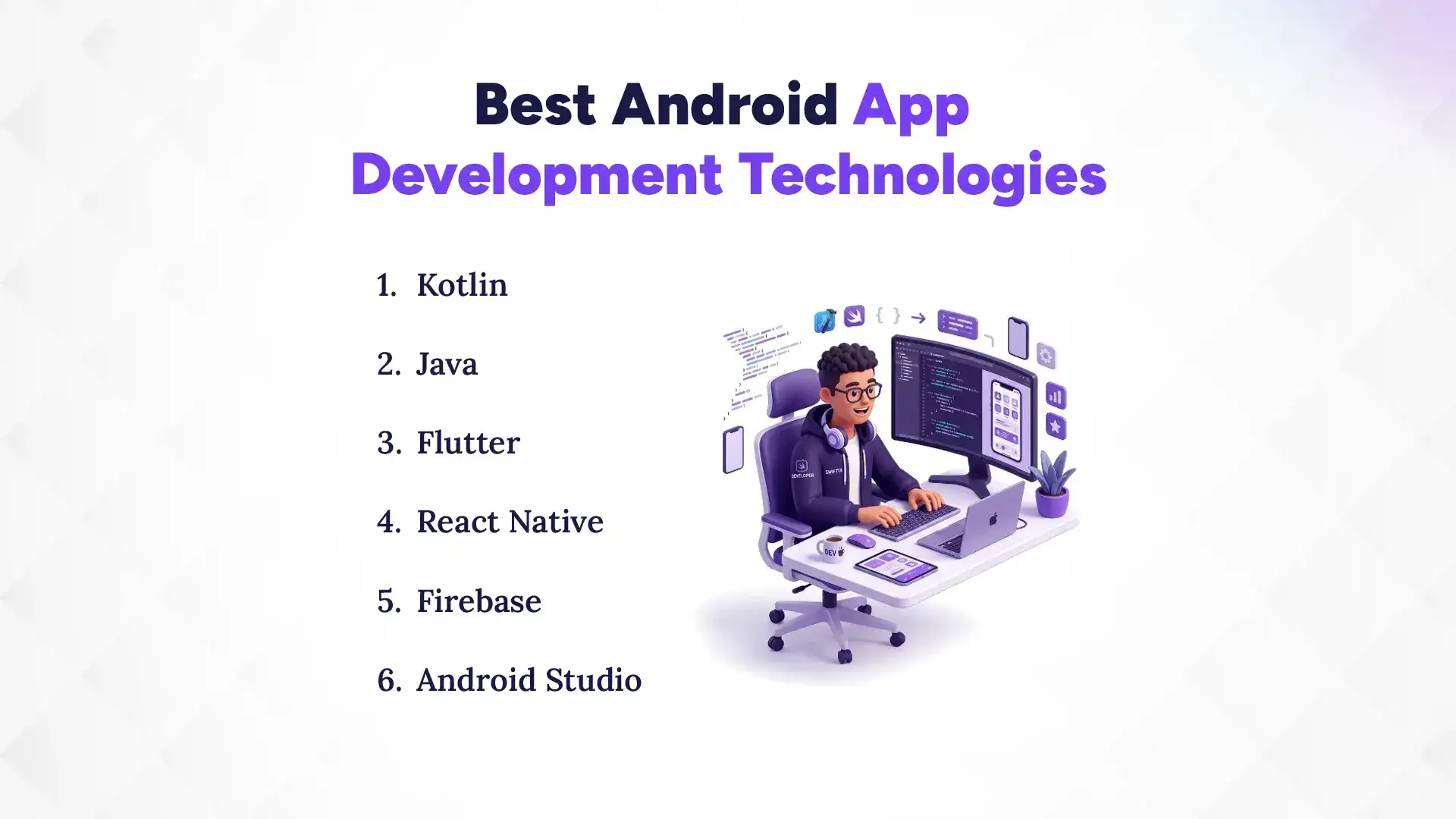
1. Kotlin
Kotlin is the modern programming language officially recommended by Google for Android app development. It is fully interoperable with Java and offers cleaner, safer, and more concise code.
Kotlin reduces coding errors and improves development speed because it requires fewer lines of code compared to Java. I have seen many companies switch from Java to Kotlin because it improves app performance and simplifies long-term maintenance.
2. Java
Java is one of the oldest and most widely used programming languages for Android development. It is stable, well-documented, and supported across almost all Android devices.
Although Kotlin is more modern, Java is still used in many large-scale and legacy Android applications. Many development teams continue to rely on Java for maintaining older systems and enterprise-level applications.
3. Flutter
Flutter is a cross-platform framework developed by Google that allows developers to build Android and iOS apps using a single codebase. It uses the Dart programming language.
Flutter is popular because it reduces development time and cost while maintaining high performance. It is often used for startups and businesses that want to launch on both platforms quickly.
4. React Native
React Native is a cross-platform framework developed by Meta (Facebook) that allows developers to build mobile apps using JavaScript and React.
It provides near-native performance and allows code sharing between Android and iOS. Many companies choose React Native when they want faster development and easier maintenance across platforms.
5. Firebase
Firebase is a backend platform by Google that provides ready-to-use services like authentication, cloud storage, databases, analytics, and push notifications.
It helps developers build apps faster without managing complex server infrastructure. I have used Firebase in several projects where real-time data and quick deployment were required.
6. Android Studio
Android Studio is the official integrated development environment (IDE) for Android app development. It provides tools for coding, debugging, testing, and performance optimization.
It supports both Kotlin and Java and includes features like emulator testing, code inspection, and UI design tools. Every professional Android development company relies on Android Studio as the core development environment.
Native vs Cross-Platform Android Development
Choosing between native and cross-platform Android development is an important decision because it affects your app’s performance, cost, development speed, and long-term scalability. Each approach has clear strengths depending on your business goals and project complexity.
What Is Native Android Development?
Native Android development is the process of building apps specifically for the Android operating system using official languages like Kotlin or Java. These apps are designed to fully utilize Android device features such as camera, GPS, storage, and system APIs.
Native apps usually deliver better performance and a smoother user experience because they are optimized for a single platform. I have seen native Android apps perform significantly better in high-traffic environments compared to cross-platform alternatives, especially in apps that require heavy processing or real-time features.
What Is Cross-Platform Development?
Cross-platform development is the process of building mobile apps that run on both Android and iOS using a single codebase. Popular frameworks include Flutter and React Native.
This approach allows businesses to launch apps faster and reduce development costs because the same code works across multiple platforms. However, it may require additional optimization for complex features or platform-specific behaviors.
Pros and Cons of Each Approach
Native Android development offers strong performance, better security, and full access to Android features. It is the best choice for apps that require high speed, complex functionality, or deep device integration.
However, native development usually takes more time and costs more because separate codebases may be required for different platforms.
Cross-platform development is faster and more cost-effective because it uses a shared codebase. It works well for startups and MVPs that need quick market entry.
The downside is that it may not fully match native performance in complex apps, and some device-specific features may require additional customization.
Which Option Is Better for Your Business?
The best option depends on your business goals, budget, and app complexity. If your priority is performance, scalability, and long-term growth, native Android development is usually the better choice.
If you want to launch quickly on both Android and iOS with a limited budget, cross-platform development is often more practical. I usually recommend businesses start with cross-platform for MVPs and move to native development as their product grows and user demand increases.
Conclusion
Choosing the right Android app development company is a critical decision that directly impacts your app’s success, user experience, and long-term business growth. From planning and design to development, testing, and post-launch support, every stage requires technical expertise and clear communication.
A strong development partner helps you build a stable, scalable, and user-friendly Android app that performs well across devices and earns positive user feedback. On the other hand, the wrong choice can lead to poor performance, budget overruns, delays, and negative reviews on the Google Play Store.
Before hiring any company, always evaluate their portfolio, technical skills, development process, and client feedback. Take time to ask the right questions and confirm ownership, pricing, and post-launch support clearly in writing.
The best decision is not the cheapest option, but the company that understands your vision and can turn it into a reliable, high-quality Android product.