If you’ve searched for UI UX design cost, you’ve probably seen prices that are all over the place. Some projects cost a few thousand dollars, while others go beyond $100,000. So why such a big difference?
Simply put, UI/UX pricing depends on what you’re building. A small business website will cost far less than a complex SaaS platform or mobile app. The number of screens, level of research, designer experience, and project scope all affect the final price, especially when combined with professional branding services that shape the overall look and identity of the product.
In this guide, we’ll break down UI/UX design cost by project type, designer level, and pricing model. With this guide on hand, you must clearly understand what to expect and how to budget wisely.
How Much Does it Cost to Hire a UI UX Designer?
The cost of hiring a UI/UX designer can vary widely anywhere from $500 for a small freelance project to over $100,000 for a complex enterprise system. That’s a huge range, and it can feel overwhelming if you’re just starting to budget for your project.
Designers usually work in one of three pricing models: hourly, per-project, or retainer-based. Hourly rates are common for freelancers or smaller tasks, giving you flexibility if your project isn’t too big. Per-project pricing is often used by agencies or more experienced designers, where you pay a fixed price based on the scope. Retainers are ideal if you need ongoing design support, like updates, testing, or long-term improvements through UI/UX design service.
Understanding these models helps you match your budget with your project needs. In the next section, we’ll break down how much UI/UX design costs by project type, from small business websites to complex mobile apps and SaaS products, so you get a realistic picture before hiring.
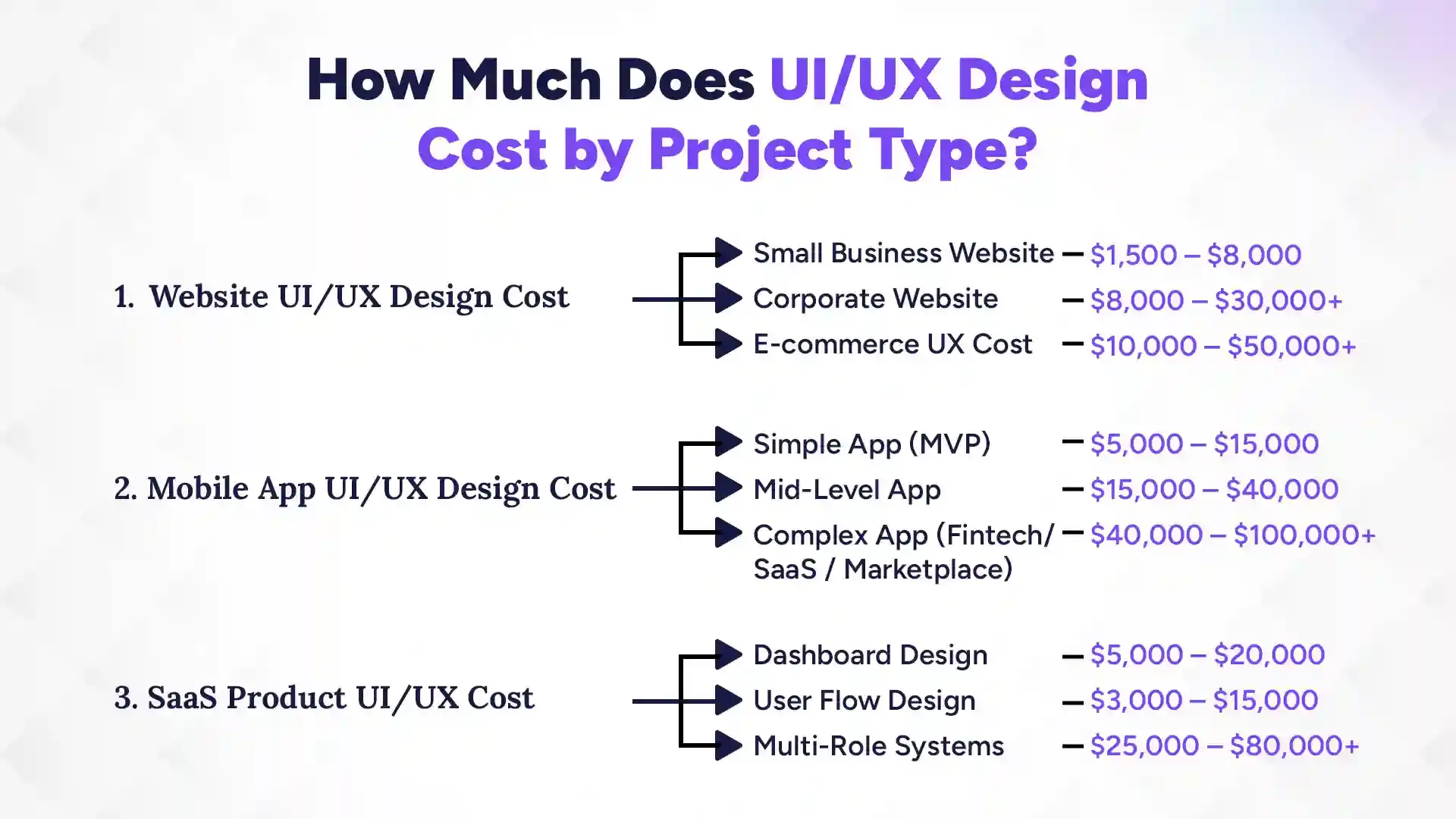
UI/UX design costs vary a lot depending on the type of project, ranging from $1,500 for a simple website to over $100,000 for a complex mobile app or SaaS platform. The main factor here is how many screens, features, and user flows your project needs. Smaller projects with fewer pages or screens naturally cost less, while larger, multi-featured platforms require more time, research, and design effort. Let’s break it down by project type so you can see what fits your budget and goals.
1. Website UI/UX Design Cost
For websites, costs depend on the size and complexity. A small business website with a few pages and basic functionality usually costs between $1,500 and $8,000. If you’re building a corporate website with more pages, custom layouts, and polished branding, expect to spend $8,000 to $30,000 or more. E-commerce platforms, where UX design directly affects sales, are even pricier. A UI/UX design package for ecommerce sites typically cost you $10,000 to $50,000+. They include product pages, checkout flows, and more detailed user journeys. The key is that every extra feature, screen, or integration adds to the design effort.
2. Mobile App UI/UX Design Cost
Mobile apps are usually more expensive than websites because they require careful attention to touch interactions, screen sizes, and user flows. A simple MVP app might cost $5,000 to $15,000, enough for a functional prototype with basic screens. A mid-level app with more features, polished animations, and extra screens can cost $15,000 to $40,000. For complex apps like fintech, SaaS, or marketplace solutions, costs can jump to $40,000 to $100,000+, since they involve multiple user roles, dashboards, and extensive user testing. The more complex your app, the more planning and iteration it needs, which naturally affects the price.
3. SaaS Product UI/UX Cost
SaaS platforms have their own pricing challenges because they usually involve dashboards, analytics, and multi-user roles. A dashboard design typically costs $5,000 to $20,000, depending on complexity and interactivity. Designing user flows for specific actions or processes can range from $3,000 to $15,000, which is essential for a smooth user experience. For multi-role systems with admins, customers, and other user types, expect $25,000 to $80,000+, as every role needs custom flows and interactions. SaaS design is all about efficiency and clarity, so investing in good UI/UX upfront can save huge headaches later.
UI UX Design Pricing by Designer Level
UI/UX design pricing varies significantly by experience level, with junior freelancers charging $20–$50/hour, mid-level $50–$100/hour, and seniors $100–$200+/hour. For projects, simple landing pages can cost $250–$500 (junior) or over $3,000 (senior). Costs are heavily influenced by geographic location, project complexity, and whether you hire a freelancer or an agency. Here’s a breakdown of typical costs by designer level.
1. Freelance UI UX Designer Cost
Hiring a freelance UI/UX designer is often the most cost-effective option, especially for small projects or startups. Hourly rates typically range from $25 to $150 per hour, depending on experience and location. For a full project, you can expect to pay anywhere between $1,000 and $15,000, which covers everything from wireframes to final designs. Freelancers are flexible and can work closely with you, but keep in mind that managing timelines and revisions usually falls on your shoulders.
2. UI UX Design Charges by Agencies
Agencies provide a more structured approach and usually bring a team of designers, researchers, and project managers to the table. Hourly rates range from $75 to $250+, while full projects can cost $10,000 to $100,000 or more, depending on complexity. Agencies handle multiple aspects of design, from research to prototypes, and often deliver a polished, ready-to-develop product. They’re great if you want a professional process and support without micromanaging every detail.
3. Enterprise UX Firms
Enterprise UX firms handle the largest and most complex systems, such as multi-role SaaS platforms or fintech products. Projects here often start at $50,000 and can go beyond $250,000, covering research, testing, prototyping, and end-to-end design strategy. These firms are ideal for businesses that need top-tier expertise and can invest in long-term design excellence.
4. In-House UI UX Designer Salary Cost
If you plan on building a long-term team, hiring an in-house UI/UX designer can be a smart move. Annual salaries vary by experience and region but generally range from $30,000 to $120,000+. While this is a bigger upfront investment, having someone in-house ensures continuous design support, faster iterations, and a deeper understanding of your brand and product. Over time, it can actually save money compared to constantly outsourcing projects.
UI UX Design Cost Per Hour
Hourly rates for UI/UX design vary widely depending on experience, location, and the type of designer or agency you hire. On average, junior designers charge $20–$50/hour, mid-level designers $50–$100/hour, and senior designers or top agencies $100–$250+/hour. These rates give you flexibility if you need short-term work, revisions, or small updates without committing to a full project.
Location plays a big role too. Designers in the US or Europe usually charge more than those in Asia or Nepal, even for similar skill levels. That’s why many businesses consider offshore hiring for cost-effective solutions, especially for smaller projects or MVPs.
Hourly pricing works best when your project scope isn’t fully defined or you expect frequent changes and iterations. If you already know exactly what you need, a per-project or retainer model may save you money and headaches.
Ready to Plan Your UI/UX Design Budget Smarter?
Get expert guidance on project scope, pricing, and user-focused design tailored to your product goals.
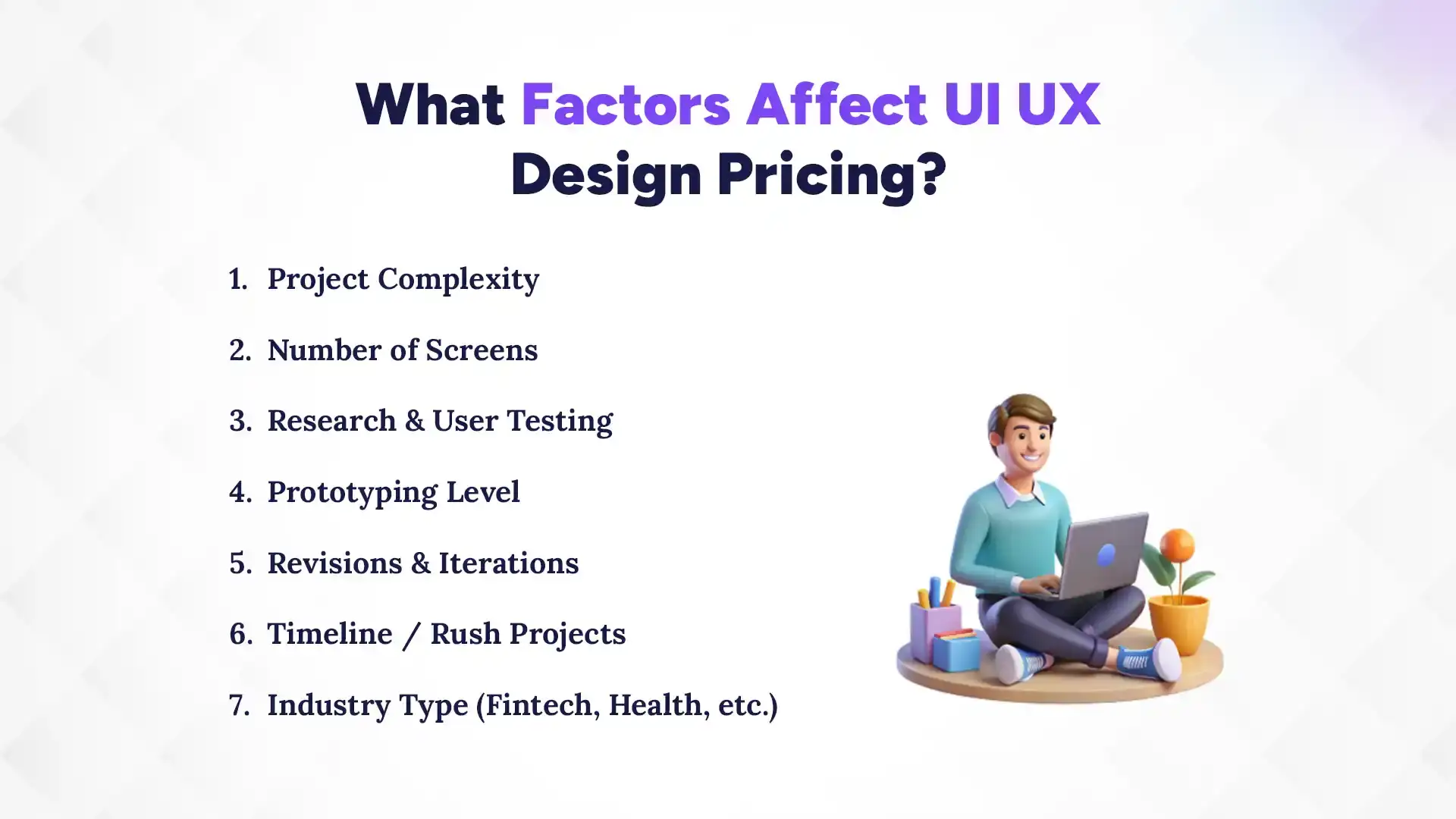
UI/UX design pricing isn’t random. Several key factors, such as, project complexity, number of pages, user research, and timeline can push the cost up or down. Understanding them helps you plan a realistic budget and avoid surprises later. Here’s a closer look at the main drivers of cost:
1. Project Complexity
The more complex your project, the higher the cost. Simple websites or apps with basic features are easier and faster to design, while platforms with multiple user roles, dashboards, and interactive elements require more planning, research, and design effort. Complexity also affects testing and iteration, which are crucial for a smooth user experience.
2. Number of Screens
Each screen in your app or website adds design time. A 5-page website will cost much less than a 50-page corporate site. Similarly, a mobile app with 10 screens is easier to design than one with 50 screens and different flows for each user type. More screens mean more wireframes, prototypes, and refinements, all of which increase cost.
3. Research & User Testing
Good UI/UX isn’t just about looking pretty, it’s about understanding your users. Conducting research and testing designs with real users takes time and resources, but it ensures your product works well and keeps users happy. Projects that include in-depth research or multiple rounds of user testing will naturally cost more, but the investment often pays off by reducing mistakes later.
4. Prototyping Level, Revisions & Iterations
High-fidelity prototypes, animations, and interactive designs take more time to create than static wireframes. On top of that, revisions and iterations based on client feedback or usability testing add extra hours. The more rounds of changes your project needs, the higher the cost, so, it helps to clarify expectations early.
5. Timeline / Rush Projects
Need your project done quickly? Rush timelines often come with premium pricing. Designers may need to prioritize your work over other clients, work longer hours, or bring in extra resources to meet tight deadlines. Planning ahead usually saves money.
6. Industry Type (Fintech, Health, etc.)
Certain industries require specialized knowledge or compliance with regulations, which can affect design costs. For example, fintech or healthcare projects often need extra attention to security, data privacy, and workflow accuracy. Designers familiar with these industries charge more because of the added expertise and care required.
Insights
Did You Know?
Investing in UX early can reduce costly revisions later and improve user retention and conversions.
Hidden or Extra Costs in UI/UX Design You Should Know
Even after you’ve budgeted for the main design work, there are hidden costs that can sneak up if you’re not prepared. These often aren’t included in basic quotes but are essential for a high-quality user experience. Being aware of them helps you plan better and avoid surprises down the line. Here’s what to keep in mind:
1. User Testing Expenses
Testing your design with real users is critical, but it comes with costs. Recruiting participants, providing incentives, and running usability sessions all add to the budget. While it may feel like an extra expense, user testing catches problems early, saving money on fixes after development. Think of it as an investment in a smoother, more successful product.
2. UX Research Tools
Designers often rely on specialized tools for wireframing, prototyping, analytics, and user testing. Tools like Figma, Sketch, InVision, and Hotjar may require subscriptions or licenses, especially for larger projects. While these tools improve quality and collaboration, their costs should be factored into your overall design budget.
3. Additional Features
Sometimes, clients request extra features or custom interactions mid-project. Each new button, animation, or interactive flow takes extra time to design and test, which can increase costs. Clear communication about scope upfront helps control these unexpected additions.
4. Future Iterations
Good UI/UX is never truly “finished.” As users give feedback or your business evolves, you may need updates, tweaks, or entirely new screens. Budgeting for future iterations ensures your product remains usable and engaging without catching you off guard financially.
What Should a Professional UI/UX Package Include?
A professional UI/UX package includes wireframes, user flow diagrams, interactive prototypes, a UI design system, developer handoff files, and usability testing reports. These elements ensure your product is not only visually appealing but also functional, easy to use, and ready for development. Hiring a designer or agency that delivers a full package helps prevent gaps, miscommunication, and costly revisions later.
1. Wireframes
Wireframes act as the blueprint of your product, showing the structure of each screen and placement of key elements. They keep the design simple at first, making it easy to adjust layouts before moving to visuals. Wireframes save time and clarify the foundation of your product.
2. User Flow Diagrams
User flows map out how users navigate your product from start to finish. They identify potential friction points and ensure the journey is smooth and intuitive. Clear flows make it easier to design screens that guide users naturally toward their goals.
3. Interactive Prototypes
Prototypes let users interact with your design as if it were a real product. Clickable buttons, scrollable screens, and animations allow testing before development starts. This reduces misunderstandings and ensures developers know exactly how the product should function.
4. UI Design System
A UI design system includes colors, typography, buttons, icons, and other visual elements used throughout your product. It guarantees consistency across screens and makes future updates faster and easier.
5. Developer Handoff Files
Handoff files provide developers with all the assets, specifications, and guidelines needed to build the product. Proper files prevent errors, save time, and ensure the design vision is realized accurately.
6. Usability Testing Reports
Usability testing reports summarize how real users interact with your product, highlighting problems and areas for improvement. Including these reports ensures your design is not just pretty but also effective and user-friendly.
Which Company Is Best for UI/UX Designer?
If you’re looking for the best UI/UX design expertise, The Pace Infosys stands out as a top choice, known for delivering creative, user-focused designs that drive results. Their team offers end-to-end UI/UX services, including wireframes, interactive prototypes, and usability testing, all customised to make digital products engaging and intuitive. Beyond skills, The Pace Infosys values professionalism, clear communication, and timely delivery, making collaboration smooth and reliable. Let’s take a closer look at how they approach UI/UX design and what sets them apart.
1. What Does a UI/UX Design Agency Do?
A UI/UX design agency takes your ideas and turns them into polished, user-friendly digital experiences. They manage the full process from planning and research to design delivery and developer handoff. Agencies also handle revisions, organize files, and make sure your project runs smoothly from start to finish. A typical UI/UX agency:
Creates wireframes and interactive prototypes
Designs user flows and dashboards
Develops visual systems and style guides
Conducts usability testing and research
Ensures consistency across screens and devices
Provides developer-ready design files
Advises on improving user engagement and conversions
2. Key Features of The Pace Infosys’ UI/UX Services
The Pace Infosys combines creativity with a structured, client-focused approach to UI/UX design. Their offerings go beyond standard design work, making them a reliable choice for businesses in Nepal and beyond:
Custom wireframes, user flows, and prototypes tailored to your product
UI design systems that maintain consistency across all screens
Usability testing reports and insights for better user experience
Clear developer handoff files to speed up development
Fast turnaround with open communication and feedback loops
Strategic design aligned with business goals and user needs
Conclusion
UI/UX design is more than just making things look pretty, it’s about creating experiences that are easy, enjoyable, and effective for your users. Costs can vary widely depending on project type, complexity, designer level, and hidden factors like research, testing, and future iterations. Whether you hire a freelancer, an agency, or build an in-house team, understanding these variables helps you plan realistically and invest wisely.
Partnering with a trusted company like The Pace Infosys ensures your product not only looks professional but also performs well, delighting users and supporting your business goals. By budgeting thoughtfully and choosing the right team, you can turn your ideas into a digital experience that truly works, and keeps users coming back.
FAQs
How much do agencies charge for UI/UX design?
+
Agencies typically charge $75–$250+ per hour or $10,000–$100,000+ per project, depending on complexity, screens, and industry.
How much does UI UX design cost per hour?
+
Hourly rates range from $25–$150 for freelancers and $75–$250+ for agencies, depending on experience, region, and project type.
What is the average cost of app UI UX design?
+
A simple app costs $5,000–$15,000, mid-level $15,000–$40,000, and complex apps $40,000–$100,000+, depending on features and screens.
How long does UI UX design take?
+
Design timelines vary from 2–6 weeks for small projects to 3–6 months for complex apps or SaaS platforms.
Is UI UX worth the investment?
+
Yes. Good UI/UX improves user retention, reduces development rework, boosts conversions, and ensures a long-term return on investment.
What are cost-effective UI/UX design solutions through offshore hiring?
+
Offshore UI/UX designers or agencies like The Pace Infosys offer skilled services at lower rates, ideal for startups or small projects without compromising quality.
How much does a 20-page website cost?
+
A 20-page website typically costs $5,000–$20,000, depending on design complexity, features, and whether you hire a freelancer, agency, or enterprise firm.
What is the cost of UI design per page?
+
UI design per page ranges from $150–$500 for simple pages to $500–$1,500+ for complex, interactive pages.
Ready to get started?
Book a 30-minute consultation call, and let's talk about your goals.